Magento 2 One Page Checkout

$149.00
Request Customization

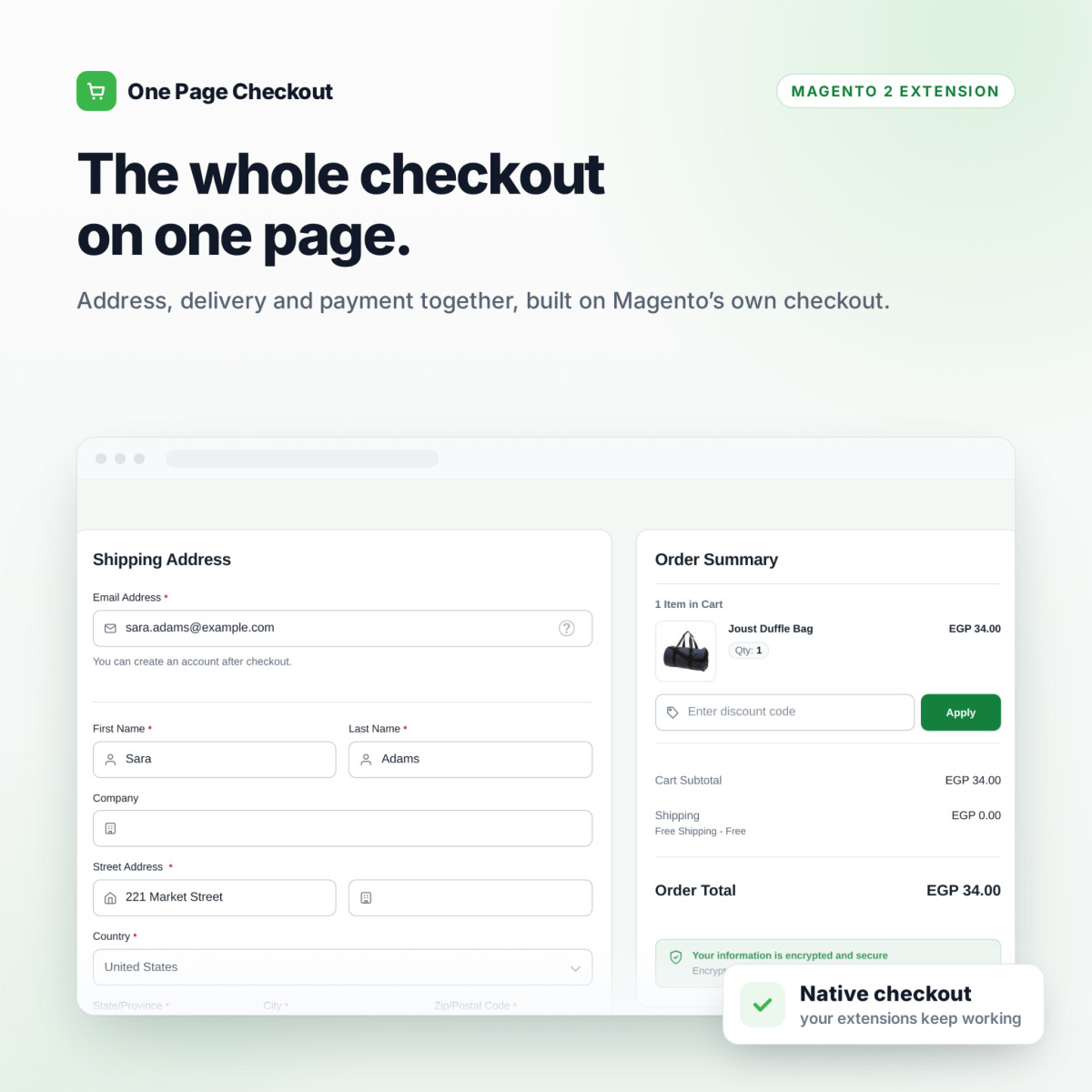
The Whole Magento 2 Checkout on One Page — Address, Delivery & Payment Together, Built on Magento's Own Checkout.

One Page Checkout rearranges Magento's native checkout onto a single page with the order summary beside it. Your payment methods, shipping carriers and checkout extensions keep working, and everything is configured from the admin — no theme work, no code.

✓Address, delivery and payment on one page, with totals updating as the customer types
✓Built on Magento's native checkout components — payment, shipping and delivery-date extensions keep working
✓Two-column or single-column layout, sticky summary on desktop, collapsible summary on mobile
✓Drag-and-drop address fields: reorder, relabel, set widths and hide optional fields
✓Colours, corner radius, font and every customer-facing text configured per store view
✓Right-to-left layout and Arabic translation included
✓Automatic fallback to the standard checkout — a customer is never left with a broken page
✓Magento 2.4.x · PHP 8.1 – 8.5 · Luma, Blank & standard-checkout themes

The Whole Checkout
on One Page.

One Page Checkout puts the address, delivery method and payment on a single page, with the order summary beside them. It rearranges Magento's own checkout instead of replacing it, so the same validation, payment methods and order placement run underneath.

Built on Magento's native checkout components — payment, shipping and delivery-date extensions made for the standard checkout keep working.
Layout, address fields, colours and every customer-facing text are configured from the admin, per store view. No theme work, no code.
Right-to-left layout and an Arabic translation included. If anything unexpected happens, customers automatically get the standard checkout.

Magento's standard checkout splits the order into steps. Customers fill in an address, press Next, wait, and only then see how they can pay. Every extra step is a chance to leave. One Page Checkout shows everything at once: address, delivery, payment and the order summary, with totals updating as the customer types.

It is not a replacement checkout. The module arranges Magento's own checkout on one page, so your payment gateways, shipping carriers, coupon form and other checkout extensions keep working as they do today. Switch it off for any store view and you are back to the native checkout instantly.

A faster checkout without rebuilding your checkout.

Most one-step checkouts replace Magento's checkout with their own and then break the extensions you rely on. This one keeps Magento underneath.

Your Extensions Keep Working

Payment methods, delivery-date and order-comment extensions, extra address attributes and the coupon form with its CAPTCHA all run on the native components the module keeps.

Safe to Switch On

Installed switched off, enabled per store view, with an automatic fallback to the standard checkout on any unexpected error. An expired or missing license never blocks an order.

Configured, Not Coded

Layout, address form, colours, font and every customer-facing text live in the admin. Changes show after a cache flush — no theme compilation, no developer needed.


Everything on One Page

Shipping address, delivery method and payment sit together on one page, with the order summary beside them. Totals refresh on their own a moment after the customer stops typing, so there is no Next button to press between steps.

Address, delivery and payment on a single page
Order summary with items, discount code and totals beside the form
Address and delivery method saved automatically after a short, configurable pause
Guest checkout with account creation after the order
Magento's own validation and order placement underneath
One Page Checkout on desktop: address, delivery and payment with the order summary

Made for Phones

Most checkouts now happen on a phone. On small screens the page becomes a single column and the order summary folds away behind a toggle, so the form stays short and the Place Order button is easy to reach.

Single-column layout on small screens
Collapsible order summary with the total always visible
Touch-friendly fields, delivery options and payment choices
One Page Checkout on a phone

Layout Options

Choose how the page is arranged for each store view. Every setting explains itself in the admin and shows its default.

Two-column or single-column layout
Order summary on either side, mirrored automatically on RTL stores
Sticky order summary on desktop
Show or hide the store header and footer, or simplify the header to the logo only
Optional "Ship To" recap beside the summary
Coupon form in the summary or in the payment section
One Page Checkout layout settings

Address Fields Your Way

A drag-and-drop table controls the address form. Reorder the fields, give them your own labels and placeholders, set their width, or hide the optional ones you do not need.

Drag rows to reorder fields
Custom label and placeholder per field
Full, half or third width
Hide optional fields such as Company
Applies to both shipping and billing forms, including attributes added by other extensions
Address Fields drag-and-drop table

Match Your Brand Without Theme Work

Ten design settings cover the look of the checkout. Pick your colours, corner radius and font in the admin and flush the cache. Nothing to compile, nothing to deploy.

Primary, button, button text, page, card, text and border colours
Corner radius from square to fully rounded
Font choice, or the shopper's system font
Optional secure-checkout trust bar beside the page title
One Page Checkout design settings

Every Text Is Yours

Every phrase the module adds to the page is prefilled with a sensible default and translated automatically for each store view's language. Change any of them per store view from the admin.

Page title, trust bar and security note
Payment placeholder and Place Order hint
Mobile summary Show / Hide labels
Per-store-view overrides with a single checkbox
One Page Checkout text settings

Arabic & Right-to-Left, Out of the Box

On a store view with a right-to-left locale the whole layout mirrors automatically, including the column order. An Arabic translation of the module's own texts is included; nothing to configure.

Automatic RTL mirroring per store view
Arabic (ar_SA) translation included
Summary side follows the reading direction
Magento's own checkout labels in Arabic too, included in PointOfCode Core
One Page Checkout in Arabic, right to left

Safe by Design

Checkout is where revenue happens, so the module is built to never stand between a customer and an order.

Installed switched off; enable it per store view when you are ready
Automatic fallback to the standard checkout if the module hits an unexpected error
License checked when saved and hourly by cron — never during checkout
Unlicensed domains simply show the standard checkout; orders are never blocked
Switched off, the checkout is exactly Magento's native checkout, with nothing added to the page
One Page Checkout general settings with fallback

Live in four steps.

Standard module installation. Nothing to build, nothing to theme.

1

Install

Install with Composer, or upload the package to app/code/PointOfCode/ (it includes PointOfCode_Core), then run setup:upgrade.

2

Enter License Key

Paste your key in Stores → Configuration → PointOfCode → One Page Checkout. Each store domain is confirmed when you save.

3

Enable & Style

Switch it on per store view, then pick the layout, address fields, colours and texts.

4

Test & Go Live

Place a test order on staging with every payment and shipping method you offer, then enable it on your live store.


Everything Included.

No add-ons. No tiers. One license covers one production domain plus its development and staging copies.

Checkout & Layout
  • Address, delivery and payment on one page
  • Two-column or single-column layout
  • Order summary side, sticky on desktop
  • Collapsible summary on mobile
  • Show, hide or simplify header and footer
  • Optional "Ship To" recap
  • Coupon form in summary or payment section
  • Configurable auto-save delay
Address Form
  • Drag-and-drop field order
  • Custom labels and placeholders
  • Full, half or third width
  • Hide optional fields
  • Shipping and billing forms
  • Supports extension-added attributes
Design & Texts
  • 7 colour settings
  • Corner radius and font
  • Optional trust bar
  • No theme compilation
  • Every customer-facing text editable
  • Texts translated per store view
Compatibility & Safety
  • Built on Magento's native checkout
  • Any payment method of the standard checkout
  • Delivery-date & order-comment extensions
  • Coupon form with CAPTCHA
  • Automatic fallback to standard checkout
  • Installed switched off, enabled per store view
Languages
  • Automatic right-to-left layout
  • Arabic (ar_SA) translation included
  • English (en_US) included
Admin & License
  • Settings per store view (license key set once)
  • Two admin permissions: view and edit
  • Domain license with hourly revalidation
  • 30-day grace if our server is unreachable
  • Clean uninstall with Composer

Compatibility & Requirements
SpecificationDetails
Magento VersionsMagento Open Source & Adobe Commerce 2.4.x
PHP VersionsPHP 8.1 – 8.5 (whichever your Magento version requires)
ThemesLuma, Blank, or any theme that uses Magento's standard checkout. Themes that replace the checkout entirely (Hyvä Checkout, Breeze and similar) are not supported.
InstallationComposer, or manual upload to app/code/PointOfCode/ (PointOfCode_Core included) + setup:upgrade
CronMagento cron running (used to revalidate the license hourly)
Outbound HTTPSTo store.pointofcode.com, for license activation only
DatabaseNo tables of its own; settings are stored in Magento configuration
LanguagesEnglish (en_US) and Arabic (ar_SA), right-to-left supported
Admin ACLTwo resources: view the module, edit its settings
LicenseDomain-bound license key. One license = one production domain, plus its development and staging copies.
SupportDirect support from the Point of Code team via store.pointofcode.com